
Hybrid work has changed how modern workplaces operate.
Instead of assigned desks, many teams now rotate workstations throughout the week — a practical model that saves space, reduces costs and supports flexibility. But shared desks also introduce a new responsibility: keeping workspaces clean, neutral and comfortable for the next person who sits down.
With hybrid working now common in the UK — and especially across the South East — more workplaces rely on shared desks rather than fixed seating.
A desk may look tidy at first glance, yet small details tell another story — fingerprints on screens, crumbs under a keyboard, a dusty chair or a sticky mouse. These things seem minor, but they affect how employees feel about their workspace. Shared surfaces can also hold allergens, dust or light skin particles, making the desk feel less “fresh” and more like someone else’s personal space.
For HR, office managers and facilities teams, workspace hygiene isn’t just about health — it’s part of employee experience, productivity and company culture. A clean workstation creates psychological comfort and signals respect; a neglected one does the opposite. That’s why businesses need a simple system, not just occasional wiping — clear desk etiquette, guidance for shared equipment and a consistent office cleaning routine that works alongside hybrid schedules.
Maintaining cleanliness in a shared workspace isn’t about constant wiping or extra duties for staff — it’s about having a reliable system. When desks, chairs and equipment rotate between different people throughout the week, hygiene standards need to be clear, consistent and easy to follow. That’s where structured policies come in. A simple Desk Hygiene Etiquette framework and a Shared Equipment protocol help keep workstations neutral, comfortable and ready for whoever uses them next, without interrupting daily work or adding pressure to the team.
Why Hot-Desking Creates Hidden Hygiene Problems
Hot-desking is efficient, flexible and cost-effective — but it also means more people share the same surfaces throughout the week. Even when a workstation looks tidy, it may not be as clean as it appears.
More people = more contact points
Keyboards, mice and desk surfaces collect invisible residue. A well-known UK hygiene study found that a keyboard can carry 3–5 times more bacteria than a toilet seat. That doesn’t mean an office is “dirty” — it simply shows how often we touch devices without noticing what’s left behind.
70% of employees share peripherals
In hybrid offices, it’s not just desks: headsets, conference phones, chargers, laptop docks and desk chairs are shared too. Even clean-looking workstations can hold allergens, crumbs, fine dust or skin particles.
Closed windows + heating = more airborne dust
During colder months, windows stay shut and heating dries the air. Dust settles faster and stays longer, especially on screens, chairs and keyboards. Without regular cleaning, that leads to irritated skin, sneezes or general discomfort — small issues that affect how employees feel about the workspace.
This isn’t about being afraid of germs.
For HR teams and office managers, it’s an operational concern:
- allergens and dust build-up
- cross-contamination on shared equipment
- short-term sickness spreading faster
- employee complaints about “dirty desks”
- lower comfort and productivity
And with around 28% of UK employees now working in a hybrid pattern (ONS, 2024), shared desks have become the new normal — especially across the South East, where companies are reducing fixed seating and introducing shared “touch-down” spaces. Cleanliness isn’t optional anymore — it’s part of employee experience and workplace culture.
Case from real office practice
A hybrid team of 20 works on a 3-days-office / 2-days-home schedule.
One desk may be used by 6–7 different employees within just 48 hours.
Even small details — crumbs under a keyboard, a greasy mouse, dust on a chair — become noticeable to the next person who sits down.
Hot-desking works brilliantly when there is a simple, consistent system in place. The first step is desk etiquette — clear, shared expectations that make every workstation feel neutral and comfortable for the next person.
The Desk Hygiene Etiquette Policy (Practical Template)
Clean desks don’t just happen — they’re the result of clear, shared expectations.
In a hybrid office, everyone contributes to keeping the environment neutral and ready for the next person. A simple “Desk Hygiene Etiquette Policy” helps avoid awkward situations, protects company equipment, and promotes mutual respect among employees.
Below is a practical framework you can adapt to your own office.
It’s designed to be realistic — not strict or overbearing — and easy to integrate into existing office cleaning routines.
Desk Hygiene Etiquette — Practical Office Guidelines
|
Category |
Expectation |
Why It Matters |
| End of the Day Routine | Clear your desk, remove personal items, throw away rubbish, and wipe surfaces before leaving. | Keeps the desk neutral for the next person and maintains a professional appearance. |
| Shared Equipment | Leave keyboards, mice, and monitors free of crumbs and fingerprints. Use provided wipes if needed. | Reduces cross-contamination and ensures comfort for the next user. |
| Food & Drinks | Avoid eating directly at shared desks; if necessary, clean immediately after. | Prevents stains, odours and bacteria from spreading. |
| Personal Items | Don’t leave mugs, tissues, chargers, or cables behind. | Keeps the space organised and avoids clutter on shared desks. |
| Sanitising Supplies | Use the wipes or spray provided by Facilities before and after each session. | Encourages consistency and visible hygiene standards. |
| Feedback & Accountability | If something looks unclean or broken, report it instead of ignoring it. | Promotes shared responsibility and helps maintain trust within teams. |
Tip: Keep desk wipes or microfibre cloths easily visible — accessibility encourages people to use them without feeling “monitored”.
Why this matters locally
Brighton, Hove, Kent and the wider South East have seen rapid growth in hybrid working, with more companies reducing fixed desks in favour of shared “touch-down” workspaces.
Clean, neutral desks are now part of employee experience — not just hygiene.
Psychological Side of Clean Desks
Clean workspaces influence more than just hygiene.
Studies show that employees working in tidy environments report higher focus and emotional comfort, while cluttered or visibly used desks increase stress and distraction.
A visible cleaning culture also reinforces the idea that the company values wellbeing — not just productivity.
Once the etiquette is in place, it’s easier to manage shared spaces proactively rather than reactively. Still, even the best policies can overlook certain high-touch zones that accumulate dirt faster than expected — and that’s where professional insight makes a difference.
Research shows that clean desks improve employee perception of safety and professionalism — two factors strongly linked to productivity and morale in hybrid teams.
The Shared Equipment Protocol
Shared equipment is the real hygiene challenge in hybrid offices.
More people touch peripherals than desks — and that’s where most complaints to HR come from. Keyboards, mice, headsets and armrests feel personal, even though they are shared assets. A simple protocol keeps things fair, neutral and comfortable for everyone.
Here is a practical protocol offices can apply without complicating the daily workflow:
Shared Equipment Protocol — Practical Guidelines
|
Equipment |
What Should Happen |
Why It Matters |
| Keyboards & Mice | Quick wipe before and after use with provided wipes or spray (never spray directly onto electronics). | Natural skin oils, crumbs and makeup transfer quickly. Small residue creates an “unclean” impression and spreads bacteria. |
| Monitors & Screens | Wipe smudges, fingerprints and makeup marks with a screen-safe cloth. | Clear screens improve visibility and prevent build-up of residue that users notice immediately. |
| Office Chairs | Armrests and seats wiped down when rotating seats. Fabric chairs deep-cleaned monthly. | Chairs collect skin particles and dust. Armrests are high-contact zones and cause most “my chair was dirty” complaints. |
| Headsets & Desk Phones | Prefer individual headsets; if shared, sanitise after each shift. | Direct contact with skin and face — highest discomfort if not cleaned properly. |
| Laptop Docks, Chargers, Stylus Pens | Wipe weekly or when visibly dirty. | Often ignored, yet touched by every user; dust and dirt accumulate around ports and buttons. |
Tip: “Shared equipment causes more workplace complaints than dusty floors — because it feels personal. A neutral, clean workstation shows respect between employees.”
Short Template to Use Internally (example notice)
Shared Equipment Hygiene
To keep our workspace comfortable for everyone, please:
- Wipe keyboards, mice and armrests before leaving the desk
- Use screen wipes for monitors if fingerprints are visible
- Leave no food or drink residue near equipment
- Report damaged or excessively dirty items to Facilities
When protocols are clear and accessible, employees follow them naturally. Still, shared desks need more than wipes — they need the right timing.
Evening vs Daytime Sanitising — What Actually Works
Keeping shared desks clean isn’t about constant wiping or adding tasks to employees’ already busy schedules. The most efficient approach is to split responsibilities between light daytime hygiene and structured evening sanitising carried out by professional cleaners. Each plays a different role, and together they keep workstations fresh without interrupting daily operations.
Daytime Hygiene
Daytime cleaning is about quick, visible touch-ups — not deep cleaning.
Employees only need a few seconds before and after using a workstation:
- Wipe keyboard and mouse
- Clear crumbs or spills
- Leave the desk neutral for the next user
This small routine is enough to remove fresh residue and maintain fairness between colleagues. It also gives employees a sense of control and psychological comfort, especially in shared or frequently rotated spaces.
Evening Sanitising
Evening cleaning is where the real detail happens. When the office is empty, professional cleaners can:
- Sanitise desks, armrests and shared equipment
- Degrease screens and remove fingerprints
- Disinfect high-touch areas such as switches and door handles
- Hoover and mop under and around desks
- Empty bins and remove food waste before it causes odours
This prevents build-up — something daytime wiping alone cannot achieve.
Deep Cleaning (Weekly or Monthly)
For hybrid offices with high desk turnover, scheduled deep cleaning protects equipment and reduces complaints. This includes:
- Upholstery and chair cleaning
- Detailed keyboard cleaning
- Dust removal under desks and around cabling
- Wiping the backs of monitors and desk dividers
A single monthly deep clean removes what daily routines miss — dust, fabric odours, stains and trapped allergens.
Comparison Table
|
Cleaning Type |
When it happens |
Who does it |
Purpose |
| Daytime wipe-down | Before/after desk use | Employees | Keeps workstations neutral for the next user, builds hygiene culture |
| Evening sanitising | After hours | Professional cleaners | Removes build-up, disinfects high-touch areas, resets the office |
| Deep cleaning | Weekly or monthly | Professional cleaning team | Chairs, upholstery, cables, keyboards — prevents odours, dust and complaints |
The right timing matters: daytime habits keep desks visibly clean, while after-hours sanitising prevents long-term dirt and discomfort. Together, they create a workplace where employees feel safe, respected and ready to work — without adding extra pressure to the team.
Psychology of Shared Spaces — Why Clean Desks Increase Productivity
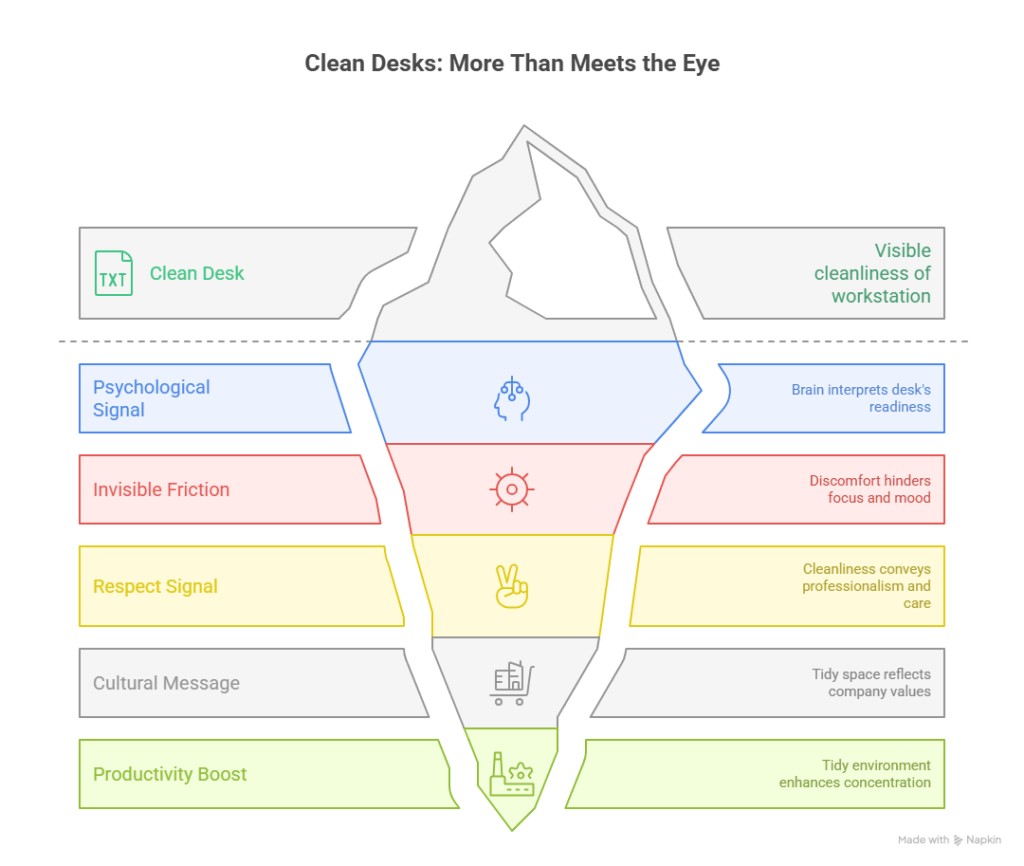
A shared desk isn’t just a surface — it’s a psychological signal. When someone sits at a clean, neutral workstation, the brain reads it as: “This space is ready for me.” When the desk feels dusty, sticky or visibly used, the message becomes: “No one really cares.”
That first impression shapes how people work, how they feel about the company, and how quickly they settle into their tasks.
Clean desks remove invisible friction
Research in workplace psychology shows that employees in organised, tidy environments report higher focus, lower stress and a better mood at the start of the day. A workstation that looks freshly prepared — free from crumbs, dust or fingerprints — helps employees begin work with a clear mind.
When a desk feels “used” instead, the reaction is immediate: hesitation, distraction or frustration before the work has even started.
Cleanliness equals respect
Shared desks feel personal, even if they rotate daily. Small details — a wiped keyboard, a dust-free chair, no stains or cup marks — act as micro-signals of professionalism and respect.
In many hybrid offices, HR teams receive more complaints about “unclean desks” than about floors or bins, precisely because workstations are intimate spaces. When the mouse and keyboard feel fresh, people feel the previous user respected them. When they don’t, tensions build.
A tidy desk improves culture
A clean shared workspace sends a cultural message:
- the office is organised
- employees respect each other’s space
- the company values wellbeing
When those signals are visible every day, motivation and trust rise naturally. People don’t have to “repair” the desk before working — they can simply sit, focus and start.
Productivity starts with environment
Studies consistently show that tidy environments help with:
- concentration
- emotional comfort
- reducing stress and frustration
A clean desk doesn’t solve every problem, but it removes barriers that quietly make the workday harder. And in a hybrid office — where one workstation might be used by multiple people within 48 hours — these small details matter more than ever.
Case from real office practice
Employee A arrives at a shared desk and finds crumbs, fingerprints and a used coffee mug.
Employee B arrives the next day — after evening sanitising — to a neutral chair, a clean screen and a fresh keyboard. The job is the same, but the start of the day feels completely different.
Once psychological comfort is established, the next step is consistency — a practical workflow that keeps desks clean without adding pressure to employees or disrupting
A Realistic Workflow for Hybrid Offices (Practical Plan)
Shared desks stay clean not because employees are constantly wiping, but because there’s a simple routine everyone understands. A realistic workflow makes hygiene effortless — small daily habits for staff, backed by scheduled professional cleaning.
Start of the day — employee workflow
A short wipe of the desk, keyboard and mouse sets a neutral starting point. It takes less than 30 seconds and prevents awkward surprises for the next user.
End of the day — employee workflow
Personal items are removed, cups and food are cleared, rubbish is disposed of and visible fingerprints or crumbs are wiped away. The workstation should feel “ready for the next person.”
Weekly — professional cleaning team
Detailed sanitising of desktops, armrests and shared equipment stops dust, skin particles and odours from building up — the issues employees notice first.
Monthly — deep cleaning specialists
Chairs, upholstery, under-desk areas, vents, cables and screens collect dust that daily routines miss. Deep cleaning keeps the workspace visually fresh and allergy-friendly.
At a glance: desk hygiene workflow
|
When |
Who |
What Happens |
| Start of the day | Employee | Quick wipe of desk, keyboard, mouse |
| End of the day | Employee | Clear items, remove rubbish, wipe visible marks |
| Weekly | Cleaning company | Surface sanitising, chairs, shared equipment |
| Monthly | Deep cleaning team | Upholstery, under-desk areas, deep dust removal |
A workflow like this removes pressure from staff, prevents complaints and keeps desks consistently clean — without interrupting productivity.
When It’s Time to Bring in Professionals
Even with clear policies and daily desk etiquette, shared workstations sometimes need more than quick wipes. There’s a point where routine cleaning can’t keep up with the level of turnover, dust, or wear. These signs usually mean it’s time to involve a professional office cleaning team:
✅ Persistent stains on chairs or desktops
✅ “Stale” or unpleasant smells around workstations
✅ Dust and crumbs building up under keyboards or screens
✅ Employees complaining about “unclean desks” or shared equipment
✅ Team members with allergies or sensitive skin reacting to dust
✅ High desk rotation — many people using the same space each week
When these issues appear, surface-level wiping simply isn’t enough. Shared desks collect skin particles, dust and oils faster than standard office furniture. Professional cleaning removes what daily routines can’t — and the difference is visible, immediate and valuable for morale.
Quick Comparison: Daily Wipe vs Professional Cleaning
|
Daily Surface Wipe |
Professional Desk Cleaning |
| Removes visible dirt | Removes residue, bacteria and allergens |
| Takes a few seconds | Sanitises chairs, armrests and peripherals |
| Good for everyday use | Essential for shared workstations and high turnover |
| Keeps desks looking tidy | Keeps desks feeling fresh, neutral and comfortable |
A professional cleaning partner doesn’t replace hygiene habits — it supports them. The result is fewer complaints, fewer unpleasant surprises, and a workspace that always feels prepared for the next person.
At Spring Cleaning TW, our office cleaning teams work after hours — so desks are sanitised, keyboards are disinfected, and employees arrive at a fresh workstation every morning, without disrupting the workday.
Ready to Make Hot-Desking Safe, Clean and Conflict-Free?
A clean shared desk is more than hygiene — it’s communication.
It shows that the workplace is organised, employees respect each other and the company takes wellbeing seriously. In hybrid offices, where workstations change hands quickly, even small cleaning routines have a big impact on comfort, productivity and culture.
If your goal is to keep desks neutral and ready for every employee — without adding pressure to your team — we can help.
Our office cleaning services are designed for hybrid environments, shared desks and high-touch equipment. We create routines that work quietly in the background, so people can simply sit down and get to work.
Book a free office assessment and we’ll recommend a cleaning workflow tailored to your schedule, desk rotation and employee needs.

